Skip to content


DJI Lito 1 And Lito X1 Firmware Update Fixes Known Issues
- by Stefan Gandhi
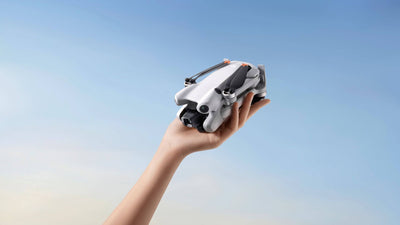
DJI released new firmware for both drones in the Lito series on 30 July 2026. The DJI Lito 1 moves to aircraft firmware v01.00.0300 and the DJI Lito X1 moves to v01.00.0400, with a shared remote controller and DJI Fly app update alongside them. Both release notes list the same single change, fixed some known issues, so this is a stability and reliability release rather than a feature drop. Here is exactly what changed, what you need to install it, and why a maintenance update like this is worth running.
What Changed In The July 2026 DJI Lito Firmware Update
DJI published separate release notes for each aircraft on 30 July 2026, and the headline is identical in both. Under 'What's New', the only entry is that DJI has fixed some known issues.
For the DJI Lito 1, aircraft firmware steps up to v01.00.0300. The previous release for this aircraft was v01.00.0200 on 23 April 2026, which added support for the propeller guard alongside its own round of fixes.
For the DJI Lito X1, aircraft firmware steps up to v01.00.0400. That follows v01.00.0300, released on 17 June 2026, which was also a fixes only update.
DJI does not itemise which faults were addressed, which is normal practice for consumer drone maintenance releases. The pattern across both aircraft is clear enough though. The Lito series is now on its third and fourth firmware revision respectively, and DJI is steadily refining a platform that launched earlier in 2026.
Remote Controller And App Versions You Need
The firmware release covers more than the aircraft. Both the Lito 1 and Lito X1 notes list the same controller and app versions, so pilots flying either drone are updating to the same baseline.
Remote controller firmware for the DJI RC 2 moves to v10.00.0800. The DJI RC-N3 moves to v01.00.0200, and the DJI RC-N2 sits at v01.00.0100.
On the app side, DJI Fly moves to v1.21.8 on both iOS and Android. DJI states that added features require DJI Fly v1.21.8 or later, so updating the app before the aircraft is the sensible order of operations.
That is a meaningful jump for RC 2 owners in particular. The Lito 1 was on controller firmware v10.00.0300 back in April, so this update closes a four version gap in one step.
How To Install The Update On Your DJI Lito
The process is the same one DJI uses across its consumer range, and it takes a few minutes on a decent connection.
Start by updating DJI Fly to v1.21.8 from the App Store or from DJI's website on Android. Charge the aircraft battery and the remote controller to at least 50 per cent, then power both on and connect them. Open DJI Fly, and the firmware prompt appears in the app. Accept it and leave both devices powered on and stationary until the process completes.
DJI Assistant 2 for the Consumer Drones series is the desktop alternative if you would rather update over USB, and it is the better route on a weak wireless connection.
Two Post Update Checks Worth Making
DJI flags one behaviour in the release notes that catches pilots out every time, and it is worth acting on before your next flight.
Camera settings are reset after the firmware update. Open DJI Fly and check your camera configuration before you fly, because any custom photo format, video resolution, frame rate, colour profile, or exposure preference you had set will have reverted to default. If you shoot in a specific profile for colour grading, this is the step that saves you a wasted flight.
The second check is a simple recovery route. If the update fails partway through, DJI's guidance is to restart the aircraft, the remote controller, and DJI Fly or DJI Assistant 2, then retry. A failed update is almost always a dropped connection rather than a fault with the aircraft, and a clean restart clears it.
Why A Fixes Only Firmware Update Still Matters
It is tempting to skip a release that adds nothing new. That is usually a mistake on a consumer drone.
Maintenance firmware typically addresses the things that surface once a platform is in thousands of hands rather than in testing. That covers connection stability between aircraft and controller, battery reporting accuracy, gimbal calibration drift, and edge cases in intelligent flight modes. None of these appear on a features list, and all of them decide how smoothly a flight goes.
There is also a compatibility argument. DJI Fly v1.21.8 is now the supported baseline for both aircraft. Running old aircraft firmware against a newer app version is where odd behaviour tends to appear, and staying current on both sides keeps the pairing in the state DJI actually tests.
The practical advice is straightforward. Update before your next planned shoot rather than on the day, check your camera settings afterwards, and take a short test flight in an open space to confirm everything behaves as expected.
FAQs
How do I update the firmware on my DJI drone?
Charge the aircraft and remote controller to at least 50 per cent, update the DJI Fly app to the latest version, then power on and connect both devices. DJI Fly will prompt you to install the firmware automatically. Leave both powered on until the update finishes, or use DJI Assistant 2 over USB as an alternative.
What is the latest DJI Lito 1 firmware version?
The latest DJI Lito 1 aircraft firmware is v01.00.0300, released on 30 July 2026. It pairs with DJI RC 2 firmware v10.00.0800, DJI RC-N3 firmware v01.00.0200, and DJI Fly v1.21.8.
Do I lose my camera settings after a DJI firmware update?
Yes. DJI confirms in the release notes that camera settings are reset after a firmware update, so check your resolution, frame rate, and colour profile in DJI Fly before flying again.
What should I do if a DJI firmware update fails?
Restart the aircraft, the remote controller, and DJI Fly or DJI Assistant 2, then retry the update. Most failed updates are caused by an interrupted connection rather than a hardware fault, so a clean restart usually resolves it.
Is it safe to skip a DJI firmware update?
Skipping updates is not recommended. Maintenance releases fix stability, connection, and battery reporting issues that only appear in real world use, and running outdated aircraft firmware against a newer DJI Fly version can cause unpredictable behaviour.
Final Thoughts
The 30 July 2026 release is a housekeeping update for the DJI Lito series, and there is no reason to delay it. Aircraft firmware v01.00.0300 for the Lito 1 and v01.00.0400 for the Lito X1 arrive alongside DJI Fly v1.21.8 and refreshed controller firmware, and DJI's own notes point to nothing more than fixed known issues. Install it, reset your camera settings, and get back in the air.
Explore our full range of camera drones and accessories at the Coptrz official online store.