Skip to content


New DJI Neo 2 Firmware Unlocks Slow-Mo And Helix Modes
- by Stefan Gandhi
DJI has pushed a fresh DJI Neo 2 firmware update on 23 June 2026, taking the palm-launch FPV drone to v01.00.0700. The headline change is two new creative capture modes, Highlight Slow-Mo and Helix Close-Up, both unlocked through the DJI Fly app. This guide covers what is in the release, the matching app and controller versions, and how to install it cleanly.
What Is In The DJI Neo 2 Firmware v01.00.0700
The release notes for v01.00.0700 list two changes:
- Added support for Highlight Slow-Mo and Helix Close-Up modes when using the DJI Fly app.
- Fixed known issues.
Both additions are creative capture modes rather than flight or safety changes. They build on the Neo 2's existing QuickShots and intelligent modes, giving creators two more ready-made shots they can fire off without manual stick work. DJI notes that the DJI Fly app must be updated to the latest version before the modes appear, and that in-app tutorials walk you through each one once they are live.
Highlight Slow-Mo And Helix Close-Up Explained
Highlight Slow-Mo is built for action. The mode captures a burst of high-frame-rate footage and automatically slows the key moment, so a jump, a trick, or a splash plays back as clean slow motion without any editing afterwards. For solo creators filming sport, watersports, or pets, it turns a single take-off into a finished hero clip.
Helix Close-Up is the more cinematic of the two. The drone spirals around a chosen subject while gradually pulling in closer, producing a tight, rotating reveal that usually takes careful manual flying to pull off. On the DJI Neo 2 it runs as a one-tap automated move, which makes a polished orbit shot accessible to pilots who have never touched the controls for that kind of manoeuvre.
Neither mode changes how the aircraft handles. They simply expand the library of automated shots the Neo 2 can produce straight out of the box, which is exactly what its target audience of social-first creators wants.
Firmware And App Versions Released On 23 June 2026
DJI shipped v01.00.0700 alongside a coordinated bundle of controller and goggles firmware. The full version list reads:
- Aircraft firmware: v01.00.0700 (DJI Neo 2)
- DJI Fly app: v1.21.0 on iOS and Android
- DJI RC 2 remote controller firmware: v10.00.0300
- DJI RC-N3 remote controller firmware: v01.00.0200
- DJI RC-N2 remote controller firmware: v01.00.0200
- DJI Goggles 3 firmware: v01.00.1300
- DJI Goggles N3 firmware: v01.00.0900
- DJI RC Motion 3 firmware: v01.00.0200
- DJI FPV Remote Controller 3 firmware: v01.00.0300
The new modes only appear once the aircraft, the DJI Fly app, and the matching controller or goggles are all on these versions, so plan to update the full kit in one session rather than piecemeal.
How To Install The v01.00.0700 Firmware
The cleanest update path runs through DJI Fly with the aircraft and remote controller paired and powered on. The basic flow is:
- Update the DJI Fly app to the latest version from the App Store or Google Play.
- Power on the DJI Neo 2 and any paired remote controller, goggles, or motion controller.
- Connect the controller to your smart device, open DJI Fly, and accept the firmware prompt for each device when it appears.
- Leave every device switched on until all progress bars complete and a confirmation message appears.
- Restart the aircraft, remote controller, and goggles after the update finishes, as DJI recommends in the release notes.
Worth knowing before you start: DJI flags that this update can reset flight parameters such as RTH altitude and maximum flight distance. Note your preferred settings before you begin so you can re-enter them after the reboot. If the update fails part way through, restart every device and the DJI Fly app, then run it again. DJI Assistant 2 (Consumer Drones Series) on a desktop offers a USB recovery path if an over-the-air update keeps stalling.
Why This Update Is Worth Running
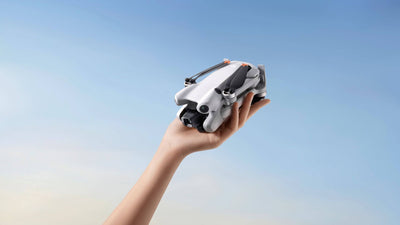
The Neo 2 sells on its simplicity, a 135g palm-launch drone that produces share-ready footage with almost no setup. Every firmware release that adds a new automated shot makes that promise stronger. Highlight Slow-Mo and Helix Close-Up give creators two fresh looks for short-form video without learning new skills or buying extra gear, and the bundled fixes keep the wider system stable. It is a quick update that genuinely expands what the drone can do before your next shoot.
FAQs
What is the latest DJI Neo 2 firmware version?
The latest firmware for the DJI Neo 2 is v01.00.0700, released on 23 June 2026. It pairs with DJI Fly app v1.21.0, DJI RC 2 firmware v10.00.0300, DJI RC-N3 firmware v01.00.0200, and DJI Goggles 3 firmware v01.00.1300.
What does the new DJI Neo 2 firmware update do?
DJI Neo 2 firmware v01.00.0700 adds two creative capture modes, Highlight Slow-Mo and Helix Close-Up, both used through the DJI Fly app. It also fixes a number of unspecified known issues to keep the drone running smoothly.
How do I update my DJI Neo 2?
Update the DJI Fly app to the latest version, power on the Neo 2 along with any paired remote controller or goggles, open DJI Fly, and accept the firmware prompt when it appears. Restart every device once the update completes, and check your RTH altitude and flight distance settings, which can reset during the update.
What is Helix Close-Up on the DJI Neo 2?
Helix Close-Up is an automated cinematic mode that spirals the Neo 2 around a chosen subject while drawing in closer. It produces a rotating reveal shot with a single tap, removing the manual flying skill that move normally requires.
Final Thoughts
DJI Neo 2 firmware v01.00.0700 is a small but creator-focused update. Highlight Slow-Mo and Helix Close-Up add two genuinely useful automated shots to one of the easiest drones to fly, and the bug fixes keep everything stable. Run it through DJI Fly before your next session and you will have two new looks ready to go.
Shop the DJI Neo 2 Fly More Combo and the DJI Neo 2 Motion Fly More Combo at the Coptrz official online store.