Skip to content


DJI Neo 2 Firmware v01.00.0600 Adds Live Photo And 4K 100fps
- by Stefan Gandhi
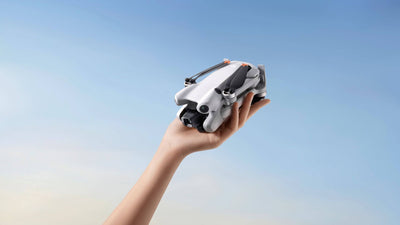
DJI has released a fresh DJI Neo 2 firmware update on 23 April 2026, taking the palm-launch FPV drone to v01.00.0600. The release adds Live Photo capture in SelfieShot and Spotlight modes, and unlocks 4K 100fps and 1080P 100fps recording in Palm Control. This guide covers exactly what is in the update, the matching app and remote controller versions, and how to install it cleanly the first time.
What Is In The DJI Neo 2 Firmware v01.00.0600
The release notes for the Neo 2 list three changes for v01.00.0600:
- Added support for Live Photo capture in SelfieShot and Spotlight mode.
- Added support for 4K 100fps and 1080P 100fps video recording in Palm Control.
- Fixed some known issues.
Both of the new features change what the drone is capable of capturing rather than how it flies. SelfieShot and Spotlight have always produced clean stills, but Live Photo brings a short motion clip alongside the still frame, the same way an iPhone's Live Photo mode wraps a still inside a one to two second video. Played back, the result is a cinematic moving frame instead of a flat photo, ideal for social posts, vlogs, and behind-the-scenes content where the action around the subject matters as much as the subject itself.
The Palm Control change is more technical. Until v01.00.0600, palm-launching the Neo 2 capped video recording at lower frame rates, which meant the smoothest slow-motion shots were locked behind the goggles or the remote controller. Now, palm-launched flights can record at 4K 100fps and 1080P 100fps, opening up genuinely high-quality slow motion from a hand take-off and zero remote.
Firmware And App Versions Released On 23 April 2026
DJI shipped v01.00.0600 with a coordinated bundle of remote controller and goggles firmware. The full version list reads:
- Aircraft firmware: v01.00.0600 (DJI Neo 2)
- DJI Fly app: v1.21.0 on iOS and Android
- DJI RC 2 remote controller firmware: v10.00.0300
- DJI RC-N3 remote controller firmware: v01.00.0200
- DJI RC-N2 remote controller firmware: v01.00.0200
- DJI Goggles 3 firmware: v01.00.1300
- DJI Goggles N3 firmware: v01.00.0900
- DJI RC Motion 3 firmware: v01.00.0200
- DJI FPV Remote Controller 3 firmware: v01.00.0300
The Neo 2 only unlocks the new features once the DJI Fly app and the matching controller or goggles have all updated together, so plan to update the full kit in one session rather than piecemeal.
Why Live Photo Capture Matters In SelfieShot And Spotlight
SelfieShot and Spotlight are the two intelligent modes most often used by content creators. SelfieShot pulls the drone backwards and upwards to frame the pilot, and Spotlight locks the camera on a chosen subject while the pilot moves the aircraft around the scene. Both produce strong stills on their own, but a still photo loses the small movements that make a moment feel alive.
Live Photo fixes that. The Neo 2 now captures a brief video clip surrounding the still, so creators get a punchy hero frame for thumbnails and a moving version for short-form video. That is a meaningful upgrade for anyone using the Neo 2 as a primary social camera, especially on Instagram and TikTok, where Live Photos play natively.
4K 100fps In Palm Control Unlocks Real Slow Motion
The second feature is the more interesting one for serious creators. Palm Control launches the Neo 2 from the pilot's hand and tracks them without a remote, which is the natural way to film cycling, parkour, watersports, dog training, and any other action where holding a controller gets in the way.
Until now, the trade-off was image quality. Palm Control kept the resolution and frame rate conservative to keep the launch reliable. With v01.00.0600 installed, palm flights can record at 4K 100fps and 1080P 100fps, the same high-frame-rate slow motion the Neo 2 already offered through the goggles or remote controller. A 100fps clip slowed to 25fps in post produces a clean 4x slow motion that looks cinematic without specialist editing.
For action content creators, that closes a gap that has limited the Neo 2's appeal as a hand-launched action camera until now.
How To Install The v01.00.0600 Firmware
The cleanest update path runs through DJI Fly, with the aircraft and remote controller paired and powered on. The basic flow is:
- Update the DJI Fly app to v1.21.0 or later from the App Store or Google Play.
- Power on the DJI Neo 2 and any paired remote controller, goggles, or motion controller.
- Connect the controller to the smart device, open DJI Fly, and accept the firmware update prompt for each device when it appears.
- Leave each device switched on until every progress bar completes and a confirmation message appears.
- Restart the aircraft, the remote controller, and the goggles after the update completes, as DJI recommends in the release notes.
Worth knowing before you start: DJI flags that this firmware update can reset flight parameters such as RTH altitude and maximum flight distance. Note your preferred settings before running the update so you can re-enter them after the reboot. If the update fails part way through, restart every device and the DJI Fly app, then run the update again. DJI Assistant 2 (Consumer Drones Series) on a desktop computer offers a USB recovery path if the over-the-air update keeps stalling.
FAQs
What is the latest DJI Neo 2 firmware version?
The latest firmware for the DJI Neo 2 is v01.00.0600, released on 23 April 2026. It pairs with DJI Fly app v1.21.0, DJI RC 2 firmware v10.00.0300, DJI RC-N3 firmware v01.00.0200, and DJI Goggles 3 firmware v01.00.1300.
What does the new DJI Neo 2 firmware update do?
DJI Neo 2 firmware v01.00.0600 adds Live Photo capture in SelfieShot and Spotlight modes, unlocks 4K 100fps and 1080P 100fps video recording in Palm Control, and fixes a number of unspecified known issues.
How do I update my DJI Neo 2?
Update the DJI Fly app to v1.21.0, power on the Neo 2 along with any paired remote controller or goggles, open DJI Fly, and accept the firmware prompt when it appears. Restart every device once the update completes, and check your RTH altitude and flight distance settings, which can reset during the update.
Can the DJI Neo 2 record 4K slow motion in Palm Control?
Yes, once v01.00.0600 is installed. The new firmware enables 4K 100fps and 1080P 100fps video recording in Palm Control, which gives creators clean slow motion footage from a hand-launched flight without needing the goggles or a remote controller.
What is Live Photo on the DJI Neo 2?
Live Photo on the DJI Neo 2 captures a short video clip wrapped around a still photograph, similar to the same feature on a smartphone. With v01.00.0600 it works in SelfieShot and Spotlight mode, producing both a hero still and a moving version of the same moment for short-form video posts.
Final Thoughts
The DJI Neo 2 firmware v01.00.0600 is a creator-focused update. Live Photo brings social-friendly motion frames to two of the Neo 2's most popular intelligent modes, and 4K 100fps in Palm Control finally lets a hand-launched flight produce the high-frame-rate footage the rest of the platform already supported. It is well worth running before your next shoot.
Shop the DJI Neo 2 Fly More Combo and the DJI Neo 2 Motion Fly More Combo at shop.coptrz.com.