Skip to content


Antigravity A1 U3 Update Adds Voice Control And AI Auto Edit
- by Stefan Gandhi
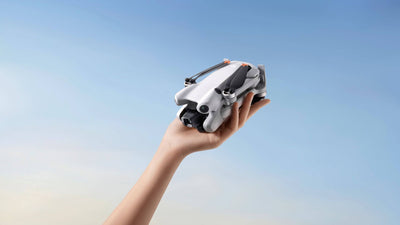
Antigravity has rolled out the Antigravity A1 U3 update, the largest firmware drop yet for the world's first 360° drone. The release brings hands-free voice control through the Vision Goggles, omnidirectional obstacle avoidance, an upgraded AI Auto Edit, and a new third-person virtual cockpit view alongside the existing first-person perspective. This guide walks through what each feature changes for pilots, why the update lifts the A1 closer to the DJI Avata 360 on capability, and how to access the upgrade.
What Is in the Antigravity A1 U3 Update
The U3 update bundles the most significant set of features the Antigravity A1 has received since launch. Antigravity has structured the release around three goals. Safer flight, easier control, and more polished creative output. The headline changes are:
- Omnidirectional obstacle avoidance in every direction, including above and below the aircraft.
- Active obstacle navigation that routes around obstacles instead of stopping in place.
- Voice control through the Vision Goggles for take-off, recording, and return-to-home.
- A third-person virtual cockpit view that the pilot can switch to mid-flight.
- An AI-enhanced Auto Edit with 360° camera moves, FPV-style shots, sound effects, and smarter editing logic.
- Upgraded flight path tools with custom path markers, waypoint camera angles, and a new timelapse mode.
The firmware rolls out via the Antigravity app and is the third major update for the A1 since launch. It follows the earlier release that introduced a virtual flight simulator inside the Vision Goggles to help new pilots get comfortable with the motion-based control scheme.
Omnidirectional Obstacle Avoidance for Real-World Flying
The biggest safety change in U3 is the move from forward-and-downward obstacle sensing to full omnidirectional coverage. The A1 now detects obstacles above and below as well as in front and beneath, which is critical for a 360° drone designed to fly aggressively through tight environments. Cyclists, skiers, urban explorers, and parkour creators all benefit, because the moment a 360° aircraft tilts into a fast manoeuvre, the danger zone is no longer in front of it.
The second part of the change matters just as much. Until U3, the A1 reacted to obstacles by stopping. From this update onward, it can actively route around them. The result is smoother, more confident flight in scenes with branches, beams, fences, or buildings nearby, because the drone keeps the action going rather than pausing the shot every time a sensor fires.
That brings the A1 much closer to the safety profile creators expect from a modern DJI airframe and removes one of the most common reasons new 360° pilots clipped a prop in the first three flights.
Voice Control Through the Vision Goggles
The most visible change in U3 is voice control. The pilot can now trigger common functions through the Vision Goggles using simple spoken commands rather than physical buttons. Take-off, recording start and stop, and return-to-home are all reachable hands-free, which is exactly the moment a 360° pilot is least able to take a hand off the motion controller.
For action creators, that is a meaningful shift. Setting up a chase shot down a forest path no longer means fumbling for a button mid-flight. The pilot calls the cue and the drone responds. It is the kind of feature the wider drone industry has talked about for years, and Antigravity is one of the first manufacturers to ship it in a useful form on a consumer airframe.
AI-Enhanced Auto Edit and the New Virtual Cockpit
The other half of U3 focuses on creative output. Auto Edit now uses AI to generate richer camera moves out of a single 360° clip, including full 360° rotation, FPV-style swoops, and dynamic re-framings that previously needed manual editing in Insta360 Studio or DaVinci Resolve. Built-in sound effects and improved editing logic round out the package, which means a casual pilot can post a polished short-form clip straight from the app rather than spending an hour in a non-linear editor.
The new third-person virtual cockpit view adds a different kind of polish. The pilot can switch between the existing first-person perspective and a chase-cam style external view in mid-flight, creating footage that feels closer to a video game than a drone clip. It is a clever way of using the 360° capture, because the same recording can be re-cut in either perspective without flying again. Combined with the upgraded flight path tools, where each waypoint can carry its own camera angle and visual marker, the U3 update materially expands what a single A1 flight can produce.
How U3 Compares With the Latest DJI Avata 360 Updates
The 360° drone race got a lot more interesting when DJI launched the Avata 360 to compete directly with the A1. Before U3, the A1 led on raw 360° capture and the Avata 360 led on safety features and ecosystem polish. The U3 update narrows that gap. Omnidirectional obstacle avoidance, AI-driven Auto Edit, and voice control are exactly the features that DJI builds reputation around, and Antigravity has now shipped its own versions on a smaller, lighter airframe at a sharper price point. Both drones remain valid choices, but the buying decision is closer than it was three months ago.
How to Get the Antigravity A1 U3 Update
The U3 firmware rolls out through the Antigravity app rather than a desktop tool. The basic flow is:
- Update the Antigravity app to the latest version from the App Store or Google Play.
- Power on the A1 along with the Vision Goggles and motion controller.
- Open the app, accept the firmware update prompt, and let each device complete its progress bar.
- Restart the aircraft, goggles, and motion controller after the update finishes.
The new features only activate once the aircraft, goggles, and the controller are all on the latest firmware, so plan to update the full kit in one session. If the over-the-air update fails part way through, restart every device and the Antigravity app and run the update again.
FAQs
What is the latest Antigravity A1 firmware update?
The latest firmware update for the Antigravity A1 is U3, which adds omnidirectional obstacle avoidance, voice control through the Vision Goggles, an AI-enhanced Auto Edit, a third-person virtual cockpit view, and upgraded flight path tools including a new timelapse mode. The update rolls out via the Antigravity app.
Does the Antigravity A1 have obstacle avoidance after the U3 update?
Yes. The U3 update gives the Antigravity A1 omnidirectional obstacle avoidance, meaning the drone can detect obstacles in every direction including above and below. It can also actively navigate around obstacles instead of simply stopping in place, producing smoother flight in tight environments.
How does voice control work on the Antigravity A1?
Voice control on the Antigravity A1 runs through the Vision Goggles after the U3 update. The pilot can trigger common functions such as take-off, recording, and return-to-home using spoken commands, which keeps both hands on the motion controller during fast or technical flights.
Is the Antigravity A1 better than the DJI Avata 360?
The Antigravity A1 and the DJI Avata 360 are both strong 360° drones aimed at slightly different pilots. The U3 update closes the gap by adding omnidirectional obstacle avoidance, voice control, and AI Auto Edit, putting the A1 closer to the Avata 360 on safety and creative polish. The right choice comes down to priorities. The A1 wins on a lighter airframe and aggressive pricing, while the Avata 360 wins on the wider DJI ecosystem.
Can the Antigravity A1 record timelapses?
Yes. The U3 update introduces a new timelapse feature alongside upgraded flight path tools. Pilots can plot a route through customisable path markers, assign a different camera angle at each waypoint, and combine the route with the new virtual cockpit view to produce more cinematic timelapses than the original firmware allowed.
Final Thoughts
The Antigravity A1 U3 update is a substantial upgrade that touches almost every part of the flight experience. Safety improves with omnidirectional obstacle avoidance and active routing. Control improves with hands-free voice commands. Creative output improves with the AI Auto Edit, the virtual cockpit view, and richer flight path tools. It is the kind of release that turns a strong launch product into a more confident long-term platform.
Shop the Antigravity A1 8K 360° Drone Explorer Bundle and the Infinity Bundle at the Coptrz official online store.