Skip to content


DJI Neo 2 Firmware Update Adds Apple Watch Control
- by Stefan Gandhi
DJI has introduced a firmware update that meaningfully changes how the DJI Neo 2 fits into everyday filming. Released on 10 December 2025, the update adds Apple Watch control through the DJI Fly app. Support also extends to the original DJI Neo and the DJI Flip, bringing wrist based control to three consumer focused drones in DJI’s lineup.
For UK drone users who film while moving, this update delivers a simpler and safer way to stay in control. Instead of stopping to unlock a phone, you can now manage key flight functions directly from your wrist while your smartphone remains safely stowed away.
Why This Matters For Active Users
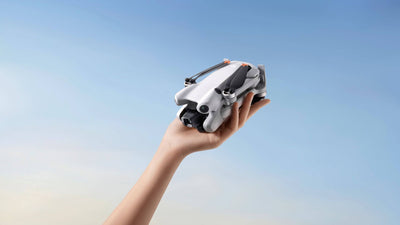
The DJI Neo 2 has always been designed around mobility. Palm launch, autonomous flight modes, and compact size make it ideal for cyclists, hikers, skiers, and casual creators. Apple Watch support strengthens that design philosophy.
Imagine cycling along a trail with the Neo 2 tracking you smoothly from behind. Mid ride, you decide the framing feels too tight. Before this update, that adjustment required stopping, reaching for your phone, and navigating menus. With Apple Watch control, the change happens in seconds without breaking rhythm.
The same benefit applies to walking routes, ski runs, and action sports where uninterrupted movement matters. Your watch becomes a quick access control panel that complements the drone’s autonomous capabilities.
Compatible Drones
Apple Watch control is available on the following DJI models once firmware and app updates are installed:
- DJI Neo 2: the latest palm launched drone with omnidirectional obstacle sensing
- Original DJI Neo: the first generation palm sized drone
- DJI Flip: a beginner friendly vlogging drone with integrated propeller guards
This wider compatibility means existing owners can benefit without upgrading hardware.
What You Need To Get Started
Setting up Apple Watch control is straightforward, but a few requirements are essential.
You must update the firmware on your supported drone and install the latest version of the DJI Fly app on your iPhone. An Apple Watch paired to that iPhone is also required.
The Apple Watch does not connect directly to the drone. Your smartphone remains the primary link. The watch functions as a remote interface, mirroring controls and visuals from the DJI Fly app while the phone handles communication with the aircraft.
How Apple Watch Control Works In Practice
Once the drone is powered on and connected via the DJI Fly app on your phone, you can open the Fly app on your Apple Watch. The connection typically happens automatically.
A live visual preview appears on the watch screen, showing exactly what the drone camera sees. This feature alone makes a noticeable difference for users who want reassurance about framing without pulling out their phone.
Drone launch still happens from the phone or the drone’s physical controls. After take-off, the Apple Watch takes over as a fast and convenient control surface for in-flight adjustments.
Switching Flight Modes From Your Wrist
Tapping the bottom area of the Apple Watch screen opens the flight mode menu. You will recognise familiar options such as Spotlight, Selfie Shot, Skiing, Follow, Boomerang, and Cycling Follow.
Mode changes are instant and do not interrupt flight. This allows you to react to your surroundings and adjust creative intent on the move.
Each mode also includes adjustable attributes. In Boomerang mode, you can change the distance of the manoeuvre. In Cycling Follow, you can fine tune follow distance, direction, and height. These settings are adjusted directly from the watch, removing friction from the filming process.
Voice Commands On Apple Watch
Voice control is fully supported through the Apple Watch interface. Saying “Hey, Fly” activates listening mode, confirmed by an on screen prompt.
You can then issue commands such as switching to Spotlight or initiating a follow mode. The drone responds with a countdown before executing the instruction, just as it does when using a smartphone.
Voice recognition feels responsive and reliable, making it a practical option when tapping the screen feels less convenient than speaking.
What The Apple Watch Update Actually Adds
This firmware update does not replace traditional controllers or smartphone control. Instead, it adds a layer of convenience tailored to autonomous flight.
Key capabilities available on Apple Watch include live camera preview, switching flight modes, adjusting mode attributes, and issuing voice commands. Launching the drone still requires your phone or the physical button on the aircraft.
The result is a more fluid flying experience that fits naturally into outdoor activities rather than interrupting them.
Limitations To Be Aware Of
Some limitations remain important to understand. The Apple Watch is not a standalone controller, and your smartphone must stay connected to the drone at all times.
You cannot initiate take-off from the watch. Advanced tracking features and manual flight controls are still better handled through a traditional controller or phone interface.
Apple Watch control works best as a companion tool during autonomous modes, where quick adjustments and visual confirmation matter most.
FAQs
Which Apple Watch models are compatible with DJI Neo 2?
Apple Watch control is supported on Apple Watch Series 8 through Series 11, along with Apple Watch Ultra 2 and Apple Watch Ultra 3. Your watch must be running watchOS 11 or newer. Apple Watch SE models are not supported. DJI also advises using an iPhone 13 or later with iOS 18 or newer for the best experience.
Do I need to keep my phone screen on during flight?
No. Your iPhone screen can be locked or used for other apps while flying. DJI Fly must remain active in the background. Closing the app completely will disconnect the Apple Watch from the drone.
How do I get DJI Fly working on my Apple Watch?
Update DJI Fly on your iPhone to version 1.19.4 or later and ensure your Apple Watch is paired correctly. Open DJI Fly on your phone first, then launch the app on your watch to access wrist based controls. Setup guides are available within DJI support resources.
Why does the live camera view stop when I lower my wrist?
When your wrist drops, Apple Watch temporarily reduces activity to save power, which pauses the live video feed. Flight and recording status remain visible. Lifting your wrist or tapping the screen restores the camera preview.
How can I keep the Apple Watch display active for longer?
You can extend the screen wake time to avoid frequent interruptions. Open Settings on your Apple Watch, select Display and Brightness, then Wake Duration, and choose Wake for 70 Seconds.
How do I turn on voice commands?
Enable microphone access for DJI Fly on your iPhone. Then open the Apple Watch settings for DJI Fly and activate Voice Control to issue spoken commands during flight.
Is audio recording supported when using Apple Watch control?
Yes. Audio recording can be enabled by granting microphone permissions in DJI Fly on your iPhone and switching on App Recording within the app’s settings.
Can DJI Fly run in Low Power Mode?
No. DJI Fly does not support Low Power Mode. To use Apple Watch control, Low Power Mode must be disabled in your Apple Watch battery settings.
Why do voice commands feel delayed or video appear laggy?
Slow responses or choppy video can result from wireless interference, background apps competing for connectivity, or low battery levels on either device. Closing unused apps and charging both devices can help improve performance.
Are there any country specific restrictions?
Yes. Apple Watch control is unavailable in regions where use of the 5.8 GHz frequency band is restricted, including Japan.
Conclusion
Apple Watch control makes the DJI Neo 2 and its compatible siblings even more appealing for active creators. The ability to view live footage, switch modes, adjust settings, and issue voice commands from your wrist keeps filming fluid and uninterrupted.
If you already own a DJI Neo 2, original Neo, or DJI Flip, updating your firmware and the DJI Fly app is an easy way to unlock extra convenience
For those looking to buy a compact consumer drone built for hands free filming, explore the DJI Neo 2 and DJI Flip available from the Coptrz official online store and enjoy the latest smart flying features.