Skip to content


Latest DJI Mini 5 Pro Firmware Makes The Drone Smarter
- by Stefan Gandhi
DJI has released a new firmware update for the Mini 5 Pro that quietly improves how the drone behaves in real world flying. While the update does not introduce flashy headline features, it focuses on areas that matter most to everyday pilots in the UK. Safety, reliability and confidence in tight environments all receive a noticeable boost.
Firmware version v01.00.0400 is now available through the DJI Fly app and DJI Assistant 2, alongside updates for compatible controllers. For recreational flyers, content creators and first time drone owners, this update makes the Mini 5 Pro feel more refined and dependable.
A Smarter Approach To Low Battery Safety
One of the most important changes in this firmware is an improved low battery Return To Home system. DJI has refined how the Mini 5 Pro calculates its remaining power and chooses the safest route back to the home point.
Previously, some pilots reported situations where the drone attempted to continue flying when battery levels were already tight. In this update, the Mini 5 Pro now behaves more cautiously. When power drops towards a critical level, the drone prioritises a safe and direct return rather than pushing its luck.
For UK users flying in wind, cooler temperatures or unfamiliar locations, this improvement adds peace of mind. It reduces the risk of forced landings and makes flight planning more predictable, especially during longer sessions or when filming multiple takes.
Official Propeller Guard Support Arrives
Another welcome improvement is official firmware support for propeller guards. While third party prop guards have been available since launch, the Mini 5 Pro now properly recognises them at a software level.
This means pilots can fit propeller guards without triggering unnecessary warnings or restrictions. Flight behaviour remains smooth and predictable, which is particularly useful when flying indoors, around obstacles or in controlled environments.
For beginners learning the basics or families using the Mini 5 Pro in enclosed spaces, propeller guard support makes the drone more approachable. It also benefits experienced pilots who need extra protection when flying close to structures or people in permitted settings.
Improved Stability & Smoother Performance
Beyond the headline changes, the update includes a range of stability improvements and fixes for known issues. DJI has addressed small quirks reported by early adopters, resulting in a more polished flying experience.
These refinements help the Mini 5 Pro maintain consistent behaviour across different flight modes. Hovering feels steadier, transitions are smoother and overall responsiveness improves. While these changes may feel subtle, they add up to a drone that feels more predictable and easier to control.
This matters for content creation, where consistency is key. Smooth flight behaviour reduces the need for retakes and post processing fixes.
What To Check After Updating
As with many DJI firmware updates, some camera settings may reset during installation. After updating, pilots should review key options such as resolution, frame rate, colour profile and exposure preferences.
Taking a few minutes to confirm your setup ensures the Mini 5 Pro performs exactly as expected on the next flight. It also avoids surprises when capturing important footage.
DJI Fly version 1.19.4 or later is required to access all features included in this update. Keeping both the app and firmware up to date ensures full compatibility and the best overall experience.
How To Install The Mini 5 Pro Firmware Update
Updating the Mini 5 Pro is straightforward. Connect the drone to the DJI Fly app and follow the on screen instructions once the update appears. The process only takes a few minutes.
Pilots who prefer using a computer can install the update through DJI Assistant 2. This method works well for users who manage multiple devices or want more control over the update process.
Before starting, ensure both the drone and controller are fully charged. Avoid powering off any devices until the update completes successfully.
Why This Update Matters For UK Drone Pilots
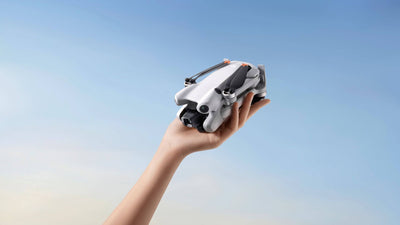
The Mini 5 Pro remains one of the most popular sub 250 g drones in the UK. Its lightweight design makes it accessible while still offering advanced imaging and intelligent flight features.
This firmware update strengthens the Mini 5 Pro’s position as a safe and user friendly option. Improved battery logic, official propeller guard support and enhanced stability all align with responsible flying and long term ownership.
For new pilots, these changes reduce stress and increase confidence. For experienced users, they deliver a more reliable tool for creative and recreational flights.
FAQs
What is new in the DJI Mini 5 Pro firmware update?
The update improves low battery Return To Home behaviour, adds official propeller guard support and fixes known stability issues.
How do I update the DJI Mini 5 Pro firmware?
Use the DJI Fly app or DJI Assistant 2 on a computer. Follow the on screen prompts once the update becomes available.
Do propeller guards affect Mini 5 Pro performance?
With official firmware support, propeller guards now work more smoothly and without unnecessary warnings or limitations.
Will my camera settings reset after updating?
Some camera settings may reset. It is recommended to review your configuration after installation.
Is the DJI Mini 5 Pro still suitable for beginners?
Yes. The latest firmware makes the drone safer, more predictable and easier to fly, which suits new pilots well.
Conclusion
The latest DJI Mini 5 Pro firmware update proves that small changes can make a big difference. By improving low battery safety, supporting propeller guards and refining overall stability, DJI has made an already capable drone feel smarter and more reliable. For UK drone enthusiasts looking for a lightweight drone that continues to improve over time, the Mini 5 Pro remains a strong choice.