Skip to content


DJI Power 1000 Mini Firmware v01.00.03.00 Adds Auto Car Charging
- by Stefan Gandhi
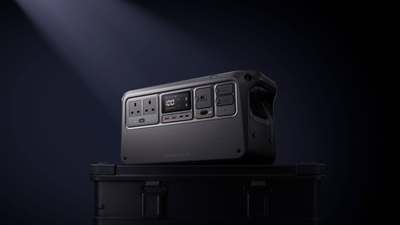
DJI has rolled out a fresh DJI Power 1000 Mini firmware update on 20 April 2026, taking the portable power station to v01.00.03.00. The release introduces a new Auto mode for car recharging, AC frequency switching from inside the DJI Home app, and a smarter on-screen time display tied to your charge limits. This guide walks through what is in the update, why each change matters in the field, and how to install it cleanly the first time.
What Is in the DJI Power 1000 Mini Firmware v01.00.03.00
The v01.00.03.00 release notes list five changes for the DJI Power 1000 Mini, each focused on smoother day-to-day use rather than a single headline feature:
- Added Auto mode for car recharging settings in DJI Home.
- Added support for switching AC frequency in DJI Home.
- Added support to update the time displayed on the screen according to the recharging or discharging limit set in DJI Home.
- Improved stability.
- Fixed some known issues.
The full bundle pairs the v01.00.03.00 station firmware with DJI Home app v1.5.15 on iOS and Android. DJI flags that the new car recharging behaviour and AC frequency selector both live inside the app, so updating DJI Home is part of the install rather than a follow-up.
Auto Mode for Car Recharging Explained
The headline change in this release is Auto mode for car recharging. Until now, drivers running the DJI Power 1000 Mini from a 12V or 24V vehicle battery had to set the input wattage manually based on the vehicle, the cable, and how much spare alternator capacity they wanted to leave for the car itself. Auto mode hands that decision to the firmware. The station reads the live conditions through the DJI Power Car Battery Charging Cable, picks a safe input wattage, and ramps it up or down in real time as the engine runs.
For drone teams running off-grid shoots, surveying jobs, and inspection days, that change removes a recurring source of small mistakes. The Mini still pulls a full 1008Wh top-up in around 160 minutes of driving, but it now does so without leaving the user to second-guess their vehicle's setup.
AC Frequency Switching for International Use
The second new feature targets pilots and content creators who travel between regions. The DJI Home app can now switch the Mini's AC output between 50Hz and 60Hz, which is useful when feeding sensitive equipment originally certified for a different mains standard. UK and EU pilots usually run at 50Hz, while equipment imported from North America or Japan often expects 60Hz. The Mini handles both natively, so a single power station covers cross-border kit without relying on an external converter.
The setting sits inside the DJI Home app rather than on the station itself, which keeps the unit's front panel uncluttered and stops the frequency being changed by accident on site.
Smarter On-Screen Time Display
The third change is small but practical. The Mini's front display now updates the time it shows according to the recharging or discharging limit set in DJI Home. If you cap the station at 80 per cent for battery longevity, the screen reflects how long it will take to reach that capped level rather than a theoretical full charge. The same applies in reverse when running a load against a discharge cut-off.
That makes the readout more honest. A pilot loading kit in the back of a van can glance at the unit and see the real working window for the day, not a generic figure that ignores the limits they have already set.
Why This Update Matters for Drone Pilots
The DJI Power 1000 Mini's strongest use case is feeding DJI drone batteries through the SDC port. The v01.00.03.00 release does not change the SDC fast charging numbers, but it does make the supporting workflow more reliable. Auto car recharging means a longer drive between locations actually tops the unit up the way you would expect. The smarter screen time means the team can plan the next battery rotation against a real number. The stability and bug fixes simply mean fewer surprises on a working day.
For new buyers, the update lands at a useful moment. The Mini has only been on the market since April 2026, and DJI is treating it as a long-term platform with regular feature drops rather than a fixed-feature release. Buying the unit today means stepping straight into a station that is still maturing in the field.
How to Install the v01.00.03.00 Firmware
The cleanest update path runs through the DJI Home app. The basic flow is:
- Update the DJI Home app to v1.5.15 or later from the App Store or Google Play.
- Power on the DJI Power 1000 Mini and pair it with your phone over Bluetooth or Wi-Fi.
- Open DJI Home, accept the firmware update prompt, and let both progress bars complete.
- Confirm the new version under About in the DJI Home settings menu after the station reboots.
If the update stalls or fails part way through, DJI's recovery procedure is to disconnect every cable and connected device, hold the power button for more than five seconds to switch the station off, exit DJI Assistant 2 (Power Series) on a desktop, then press and hold the AC button and the power button at the same time while connecting the station to a computer over USB-C. From there, retry the update through DJI Assistant 2 (Power Series). It is rare to need this path, but useful to have on hand for a fleet of stations.
FAQs
What is the latest DJI Power 1000 Mini firmware version?
The latest firmware for the DJI Power 1000 Mini is v01.00.03.00, released on 20 April 2026. It pairs with DJI Home app v1.5.15 on iOS and Android.
What does the new DJI Power 1000 Mini firmware update do?
Firmware v01.00.03.00 adds Auto mode for car recharging, an AC frequency switcher in DJI Home, and an updated on-screen time display tied to your recharge or discharge limits. It also improves overall stability and fixes a number of unspecified known issues.
How do I update my DJI Power 1000 Mini?
Update the DJI Home app to v1.5.15, power on the station, pair with the app, and accept the firmware update prompt. If the over-the-air update fails, DJI Assistant 2 (Power Series) on a desktop computer can flash the same firmware over USB-C using the recovery key combination.
Can the DJI Power 1000 Mini auto-charge from a car?
Yes. With v01.00.03.00 installed, the DJI Home app exposes a new Auto mode that lets the station read live vehicle conditions and pick a safe input wattage automatically. Use it with the DJI Power Car Battery Charging Cable for the full 1008Wh top-up in around 160 minutes of driving.
Does the DJI Power 1000 Mini support both 50Hz and 60Hz?
Yes. The v01.00.03.00 update adds an AC frequency switcher inside the DJI Home app, allowing the Mini to output either 50Hz or 60Hz on its AC sockets. That covers UK, EU, North American, and Japanese equipment from a single power station.
Final Thoughts
The DJI Power 1000 Mini firmware v01.00.03.00 is a quiet but worthwhile update. Auto car recharging removes a real-world friction point, AC frequency switching widens the range of kit the station can power, and the smarter screen display makes the unit easier to plan around. The update is well worth running before your next field shoot or off-grid recharge cycle.
Learn more about the DJI Power 1000 Mini by contacting our team at sales@coptrz.com or 0330 111 7177.