Skip to content


How To Count Boats And Vehicles At A Port With The DJI Matrice 4T
- by Stefan Gandhi
Counting every boat and vehicle across a busy port by hand can take hours, and on a large site it is barely possible at all. A new tutorial from DJI Enterprise shows how the DJI Matrice 4T turns that job into a single hover, pairing High-Res Grid Photo mode with onboard AI detection to count every target in roughly a minute. Here is how the workflow runs, step by step, and why it matters for port operators, marinas and anyone managing large car parks.
Why Manual Counting Across A Port Falls Short
Ports are some of the busiest and most spread out sites a drone operator will fly. Docks are crowded with vessels, car parks fill and empty throughout the day, and staff are expected to count boats, find empty parking bays and spot vehicles parked where they should not be.
The traditional drone approach involves capturing photos one at a time and then counting targets frame by frame. As DJI points out in the video, the hardest part is not flying the aircraft but staying focused across hundreds of objects. Missed or double counted targets are easy to make when you are stitching the picture together in your head.
How High-Res Grid Photo And AI Detection Work Together
The Matrice 4T solves this by combining two features. High-Res Grid Photo lets the operator draw a frame over a wide area, after which the drone automatically captures a grid of detailed, zoomed images covering everything inside that frame. Onboard AI detection then identifies the targets you have chosen, such as vehicles and boats, within that imagery.
The result, in DJI's words, is one minute and one photo to count every target across the whole port. Instead of an operator working through dozens of separate shots, the aircraft does the heavy lifting and the operator simply supervises.
How To Count Vehicles And Boats With The DJI Matrice 4T
The workflow shown in the tutorial is quick to set up. Follow these steps on the Matrice 4T.
1. Enable Onboard AI
Switch on the aircraft's onboard AI recognition before you begin the capture.
2. Select Your Detection Targets
Choose vehicles and boats as the object classes you want the drone to detect.
3. Set The Capture Mode To High-Res Grid
Change the camera capture mode to High-Res Grid so the aircraft knows to shoot a series of tiles rather than a single frame.
4. Drag The Grid Frame Over The Area
On the controller screen, drag the grid frame so it covers the entire port and parking area you want to survey.
5. Capture And Hold A Steady Hover
Press capture, then leave the controls alone. DJI stresses that this is the most important step. Do not touch the sticks or the gimbal. A steady hover is all it takes while the drone captures every shot on its own.
Once the sequence finishes, you have a detailed composite of the whole area with AI detections applied, ready for counting and review.
Custom AI Models For Wider Detection Tasks
High-Res Grid is not limited to DJI's built in AI models. The tutorial confirms that operators can also load custom models, which opens the same one hover workflow to other target types beyond cars and boats.
That flexibility makes the approach useful well beyond ports. The same method suits any wide area task where the job is to find and count objects, from monitoring car park occupancy at retail parks and airports to checking yard stock at logistics hubs.
Why The Matrice 4T Suits Port And Harbour Operations
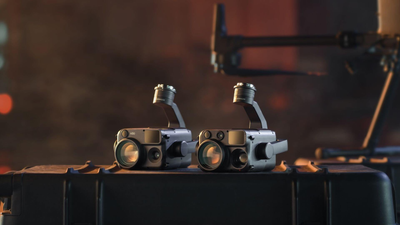
The Matrice 4T is a compact enterprise drone built for inspection, public safety and security work. Its camera system combines a 48MP wide camera, a 70mm medium tele and a 168mm tele camera with a radiometric thermal sensor and a laser rangefinder, all in one gimbal.
For port teams that means one aircraft covers several jobs. The zoom cameras resolve individual vehicles and vessels from a safe stand off distance, the thermal camera supports night time security patrols and search and rescue along the waterfront, and the laser rangefinder helps pinpoint the location of anything of interest.
Typical port and harbour use cases include:
- Counting vessels at berths and marina moorings
- Identifying empty parking spaces and improperly parked vehicles
- Perimeter security and night patrols with thermal imaging
- Rapid situational awareness during incidents on the quayside
Getting Started With AI Drone Counting In The UK
Before flying a commercial workflow like this over a port, UK operators need the right paperwork in place. That includes a CAA Operator ID and Flyer ID, and depending on the operation, an A2 CofC, a GVC or an RPC-L1 qualification along with any landowner or port authority permissions.
Ports also tend to sit close to controlled airspace, restricted zones and busy vessel traffic, so careful pre flight planning is essential. Coptrz delivers the training UK teams need to operate the Matrice 4T commercially and safely.
FAQs
What is high-res grid photo on the DJI Matrice 4?
High-Res Grid Photo is a capture mode on the DJI Matrice 4 Series that shoots a grid of detailed zoom images across an area you define on screen. The images combine into one high resolution result, so you can inspect or count objects across a wide scene in fine detail.
Can the DJI Matrice 4T detect vehicles?
Yes. The Matrice 4T has onboard AI recognition that can detect vehicles, boats and people. Combined with High-Res Grid Photo, it can identify and help count targets across an entire port or car park in a single hover.
Can you use custom AI models on the DJI Matrice 4T?
According to DJI Enterprise, High-Res Grid is not limited to the built in AI models and custom models can also be loaded. This lets operators adapt the workflow to other object types and wide area tasks.
Do I need a licence to fly a DJI Matrice 4T in the UK?
You need a CAA Operator ID and Flyer ID to fly the Matrice 4T. For commercial work, most operators also hold an A2 CofC, GVC or RPC-L1, depending on where and how they fly.
What is the difference between the Matrice 4T and Matrice 4E?
The Matrice 4T carries a thermal camera alongside its visual cameras, making it suited to inspection, security and public safety work. The Matrice 4E is geared towards mapping and surveying with a mechanical shutter wide camera for photogrammetry.
Final Thoughts
DJI's port tutorial shows how much time smart capture modes can save. By pairing High-Res Grid Photo with onboard AI detection, the Matrice 4T turns a tedious, error prone counting job into a one minute hover, and custom models extend the same approach to almost any wide area task.
Shop the DJI Matrice 4T thermal drone at the Coptrz official online store and put AI powered counting to work across your own site.